All in One Branded Ai Workspace; AccountingInvoicingQuotesPayrollReportsTeamsIRA Education
What If Your Books Closed Themselves?
Built for entrepreneurs, freelancers, contractors, family-owned shops, agencies, nonprofits, and growing teams alike — CheckSmith.ai brings branded invoicing, automated bookkeeping, payroll, client portals, and self-directed IRA tracking into one intelligent workspace. Our 5-minute guided setup sequence guides you from sign-up to your first invoice, with bank-level security and Ai that quietly handles any repetitive work.
5-minute setupNo credit cardFree to start
How the Ai Works
Invoicing and Accounting, Automated by Ai
Spend less time on data entry and more time running your business. Our Ai handles the repetitive financial work in the background.

Auto-Categorized Books
Smart Payroll Insights
Watch Alice Read an Invoice and Post a Transaction
Pick a sample invoice and press play. In a few seconds you'll see CheckSmith.ai scan the document, extract every field, and draft a balanced journal entry — the same flow your team gets in the app.
Upload a PDF, PNG, JPG, or WEBP up to 6 MB. Your file is sent to the Ai only for this preview — nothing is stored.
Invoice
The Home Depot #4412
#HD-88213 · 2026-07-12
24 × 2x4x8 Framing Lumber$140.88
2 × Deck Screws, 5 lb box$65.00
1 × Contractor Trash Bags$18.97
Subtotal$224.85
Sales Tax$16.30
Total$241.15
Ai Extracted
Run Demo, or use Step Through to advance one field at a time.
Journal Entry
Waiting for extracted data…
Simulated preview using sample data. Sign in to run it on your own invoices.
Inside the Workspace
Real UI Examples of Ai-Powered Financial Workflow
See how invoice drafts and categorized transactions look once the Ai has done its work.
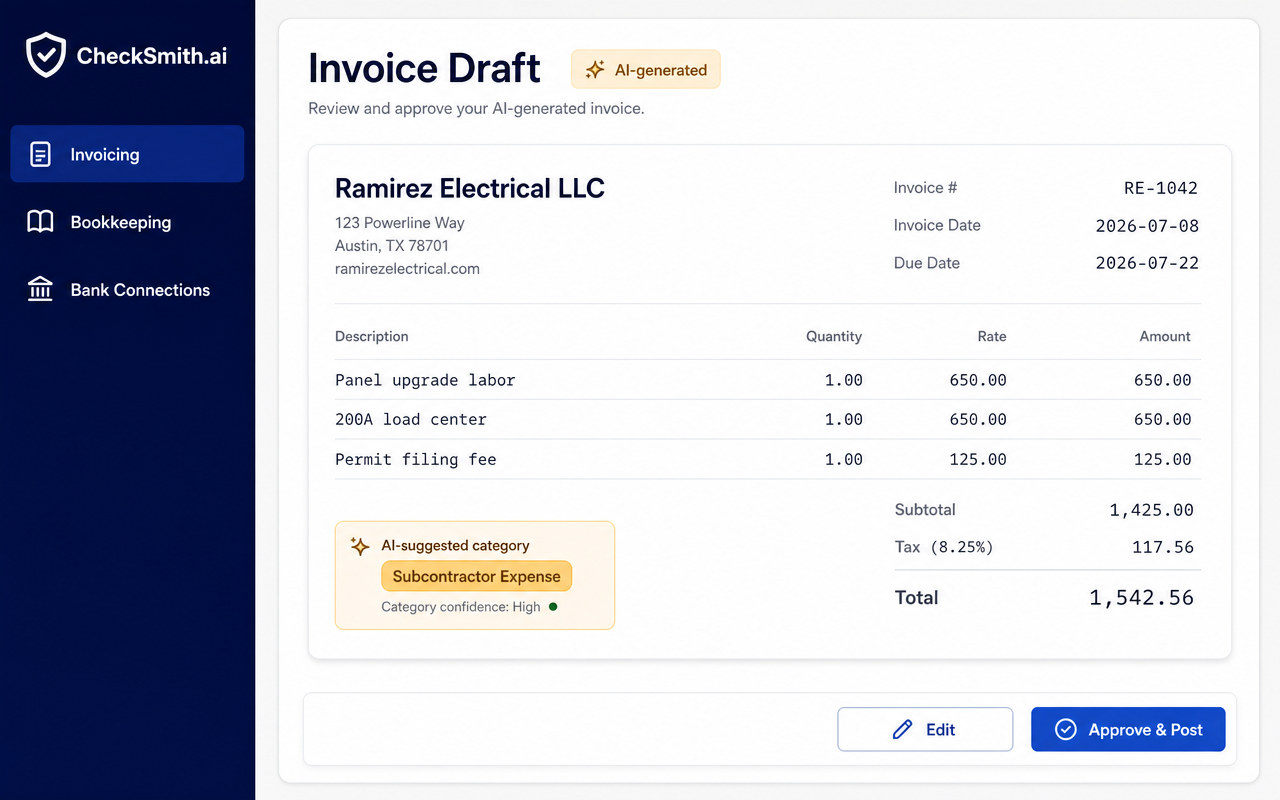
Ai Invoice Draft
The Ai extracts vendor, dates, line items, and suggests the right expense category before you approve.
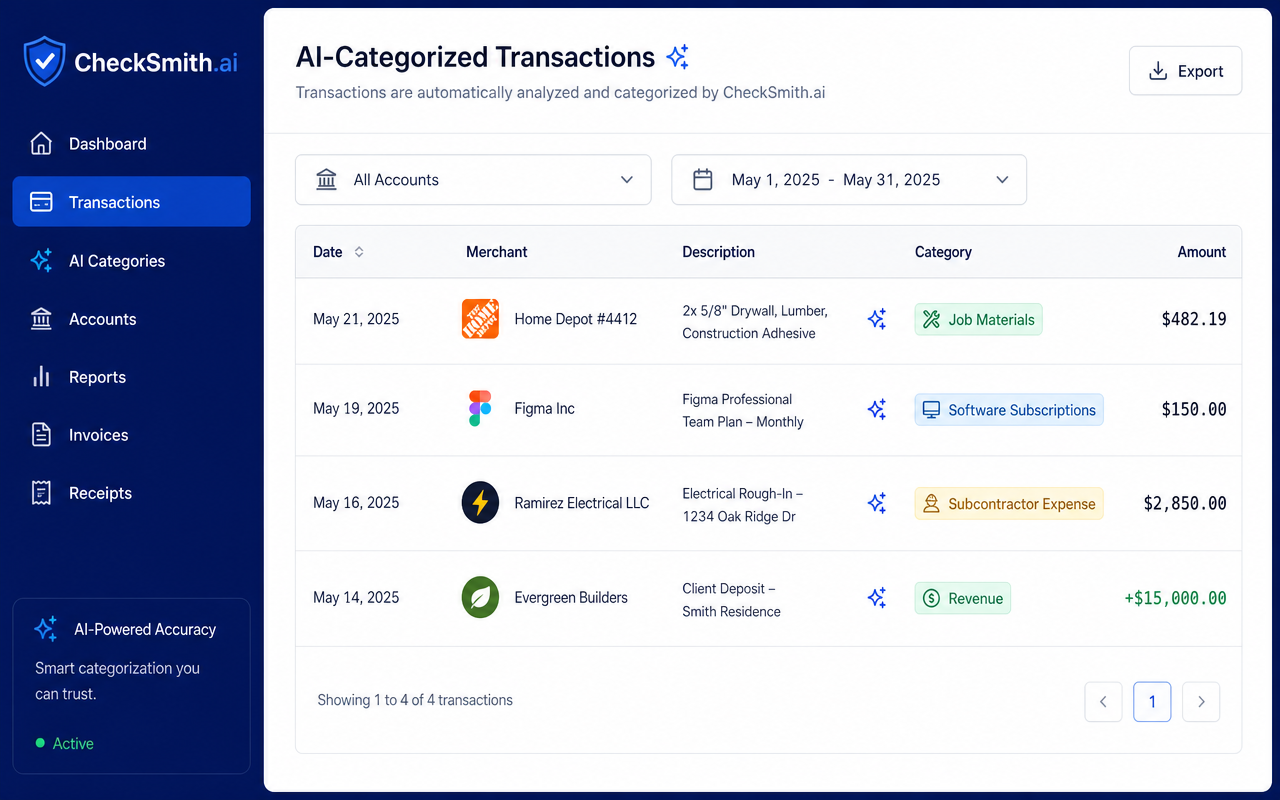
Auto-Categorized Transactions
Connected bank feeds are sorted into accounts like Job Materials, Software, and Subcontractor Expense automatically.
Get Started in Minutes
What Happens After You Create Your Free Account?
No setup fees, no credit card, no confusion. Just four simple steps to financial clarity.
Trusted by Independent Founders


5 min
Average setup time
From sign-up to first invoice sent
12+ hrs
Saved per month
Owner-reported time back on accounting
99.9%
Uptime, 90-day rolling
So your books are always reachable
4.9 / 5
Owner satisfaction
From onboarded SMB users this quarter
Built for Small and Mid-Sized Businesses
Owners Who Stopped Juggling Multiple Apps
Real feedback from founders and operators who moved their invoicing, books, and payroll tracking into a single branded workspace.
Rated 5 out of 5
I stopped copying totals between three tools. Invoices go out branded, the deposits land in the ledger, and my accountant finally quit emailing me on Sundays.
ML
Marcus L.
Owner · TMW Trucking LLC
Rated 5 out of 5
The Ai reads a receipt in seconds and drops it into the right account. What used to be a Friday-night ritual is a two-minute review on my phone now.
JB
Joe Barnhill
Founder · Barnhill Construction
Rated 5 out of 5
We connected our bank on a Tuesday and had clean books by Thursday. First platform that actually felt built for a 12-person crew, not a Fortune 500.
ER
Elena R.
Operations Lead · Advance Concrete
Smart Invoicing
Auto-Accounting
Self-Directed IRA
Everything Included
A Complete Financial Toolkit
One workspace covers invoicing, books, retirement, branding, and the guardrails that keep it all safe.
Live Walkthrough
Four Stops Through A Real Workspace
Nothing to sign up for. Each stop opens a working page inside a live CheckSmith.ai demo company.
- 1
Start At The Workspace
View a branded company home with its own colors, logo, and live figures.
Open the workspace - 2
Add The People You Bill
Customers and vendors kept in one clean list, ready for invoices.
See the client list - 3
Send An Invoice
A real invoice with line items, totals, and its payment status.
See an invoice - 4
Watch The Books Update
Every payment lands in the ledger, sorted and ready for tax time.
See the ledger
CheckSmith.ai vs Wave vs QuickBooks
Everything Wave and QuickBooks Do, Plus a Retirement Engine
Match Wave's free basics and QuickBooks' pro-grade accounting — and add a self-directed IRA neither one offers.
- Branded Invoicing
- CheckSmith.ai
- Wave
- QuickBooks
- Recurring Invoices & Reminders
- CheckSmith.ai
- Wave
- QuickBooks
- Income & Expense Tracking
- CheckSmith.ai
- Wave
- QuickBooks
- Chart of Accounts & P&L Reports
- CheckSmith.ai
- Wave
- QuickBooks
- Bank & Credit Card Connections
- CheckSmith.ai
- Wave
- QuickBooks
- Multi-User Team Roles
- CheckSmith.ai
- Wave
- Limited
- QuickBooks
- Higher tiers
- Custom Branding Across the Entire Workspace
- CheckSmith.ai
- Wave
- Invoices only
- QuickBooks
- Invoices only
- Ai Transaction Categorization & Q&A
- CheckSmith.ai
- Wave
- QuickBooks
- Categorization only
- Self-Directed IRA Setup (Partnered Custodian)Exclusive
- CheckSmith.ai
- Wave
- QuickBooks
- Alternative Asset Tracking (Real Estate, PE, Metals)Exclusive
- CheckSmith.ai
- Wave
- QuickBooks
- Retirement Contribution Progress & Custodian ExportsExclusive
- CheckSmith.ai
- Wave
- QuickBooks
- Retirement Performance Alongside Business BooksExclusive
- CheckSmith.ai
- Wave
- QuickBooks
| Capability | CheckSmith.ai | Wave | QuickBooks |
|---|---|---|---|
| Branded Invoicing | |||
| Recurring Invoices & Reminders | |||
| Income & Expense Tracking | |||
| Chart of Accounts & P&L Reports | |||
| Bank & Credit Card Connections | |||
| Multi-User Team Roles | Limited | Higher tiers | |
| Custom Branding Across the Entire Workspace | Invoices only | Invoices only | |
| Ai Transaction Categorization & Q&A | Categorization only | ||
| Self-Directed IRA Setup (Partnered Custodian)CheckSmith.ai Exclusive | |||
| Alternative Asset Tracking (Real Estate, PE, Metals)CheckSmith.ai Exclusive | |||
| Retirement Contribution Progress & Custodian ExportsCheckSmith.ai Exclusive | |||
| Retirement Performance Alongside Business BooksCheckSmith.ai Exclusive |
Comparison based on publicly documented Wave and QuickBooks features as of 2026. Wave and QuickBooks are trademarks of their respective owners and are not affiliated with CheckSmith.ai.
Frequently Asked Questions
Quick Answers to Common Questions
Onboarding, custom branding, and self-funded IRA setup — explained simply.
The 5-minute setup creates your branded workspace, connects your bank and credit card feeds, builds your chart of accounts, sends your first invoice, and configures your client portal. Most users are live and ready to send invoices before the timer runs out. Read the full checklist →
Have your business name, email, logo file (optional), and online banking credentials ready. If you plan to run payroll or invite team members, keep their names and email addresses handy. No accounting knowledge or prior software setup is required. See the preparation list →
After setup, CheckSmith.ai begins importing and categorizing transactions automatically. You can send invoices, track expenses, review Ai-suggested books, and invite your accountant or team. Advanced features like payroll, IRA tracking, and bank reconciliation can be turned on when you are ready. See what happens next →
Sign up, connect your bank and business accounts, and invite your team. Our guided 5-minute setup walks you through invoicing, accounting, and IRA tracking — no accounting background required.
Yes. Upload your logo, choose brand colors, and apply them across invoices, client portals, reports, and email communications so every touchpoint feels like yours.
Open a self-directed IRA through our partnered custodian, link it to CheckSmith.ai, and start tracking alternative assets like real estate, private equity, and precious metals alongside your business finances.
Absolutely. We use bank-level encryption, secure authentication, and role-based access controls. Your financial data is protected and never sold or shared without your permission.
Every plan includes email support and access to our knowledge base. Paid plans add priority chat support and dedicated onboarding assistance for you and your team.